
Media
Digital Media
Digital Media
Editorial e-newsletters
Combined with lead append data for maximum results.
Engineering.com uses the latest in marketing automation, lead and profile management software to ensure all e-news delivery is optimized and targeted only at permission-based users and optimized by device. Tracking details, performance and detailed reporting are provided for all placements.
SPECIFICATIONS: There are 5 text-based ad placements available.
SINGLE AD SPECS:
Text ad:
• Image: 450×255 static jpg or gif file
• Title: 5-10 words
• Copy: 50-75 words
• Call to Action (3 to 5 Words) + URL
EXCLUSIVE SPECS:
As an exclusive e-newsletter advertiser you will have placements in all 5 ad spots (728×90, 300×250 & 3 text ads).
• Leaderboard ad (728×90) + URL
• Box ad (300×250) + URL
WEEKLY NEWSLETTERS
- Engineering.com – Reach: 80,220
- Design – Reach: 31,988
BI-WEEKLY NEWSLETTERS
- Simulation
- 3D Printing – Reach: 15,634
- Digital Transformation – Reach: 29,577
Partner Promotions
Your HTML, our audience
SPONSOR HTML
Design World offers customer provided HTML sends to reach targeted segments of our opt-in 3rd party e-newsletter audience.
Custom e-delivery lists are available on a limited basis for delivering custom-branded messaging to targeted opt-in audiences.
- Setup: Includes initial list pull – count only, suppression (up to 1M emails), tests, content checking and reporting
SPONSOR PROVIDED HTML SPECS:
- Preferred subject line (recommend 70-80
characters including spaces) - Completed HTML file:
- The html file should be a max width of 650 pixels
- Use absolute URLs for your images (i.e.“http://www.yourdomain.com/image1.jpg” -do not use “…/image1.jpg”)
- Avoid using “div” & “float”, as some email clients will not render that code. Instead use tables to control layout
- Styling should be done inline with the tags and not in the header area.
- Text version of eblast (optional)
- Seed list (email addresses of anyone that should receive a copy of the live deployment)
- Suppression file – optional but recommended (.csv or .xlsx file of email addresses of those that do not wish to receive communications from the advertiser)
- Max image file size limit: 500 KB. If HTML consists of multiple images, individual images should be no larger than 500 KB
IMPORTANT! WTWH uses custom software and 3rd party services to check the content of the HTML creative for redflags that might prohibit delivery. Due to a matrix of conditions from mail servers, firewalls, mail clients, operating systems and preference settings unique to each user, Engineering.com acknowledges and cannot control differences in how the creative will render across device. If HTML coding time is requested, additional fees are incurred. Please contact your business development representative for more information.
- Outlook uses an engine that has a 1728 pixel limit for the height of images displayed in an email.
- WTWH Media recommends not using image-only emails as your HTML eblast, as these tend to load slowly or will not load at all.
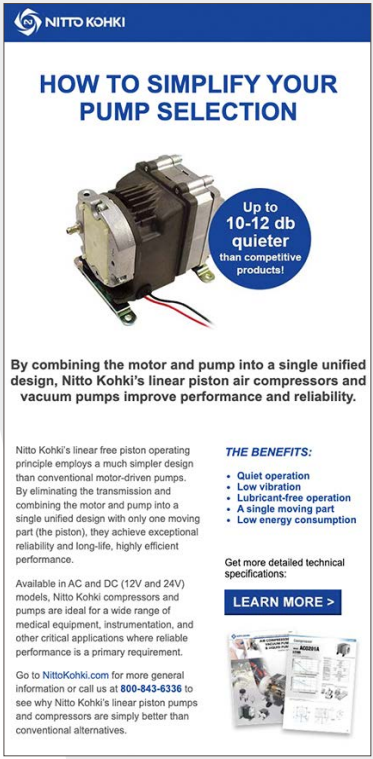
Our template, your message
SINGLE OFFER TEMPLATE
Provide WTWH with your message and we will create an email using our branded template
Custom e-delivery lists are available on a limited basis for delivering custom-branded messaging to targeted opt-in audiences.
- Setup: Includes initial list pull – count only, suppression (up to 1M emails), tests, content checking and reporting
SINGLE OFFER SPECS
- Preferred subject line (recommend 70-80
characters including spaces) - Main Image: 650×300 static jpg or gif
- Company logo: minimum 150 pixels wide; static jpg or gif
- Headline: 5-10 words
- Descriptive Copy: 30-80 words
- Call-to-action (3-5 words)
- URL or PDF file of resource
- Max image file size limit: 500 KB B
SINGLE OFFER + LEAD GENERATION
Our single offer template with your message plus we create a lead form landing page with the following standard fields: Email, F/L Name, Company, Postal Code & Country
SPECIFICATIONS FOR A SINGLE OFFER WITH LEAD GENERATION
Same as single offer specs plus URL or PDF file of resource. Price based on CPM / Lead Requirements.
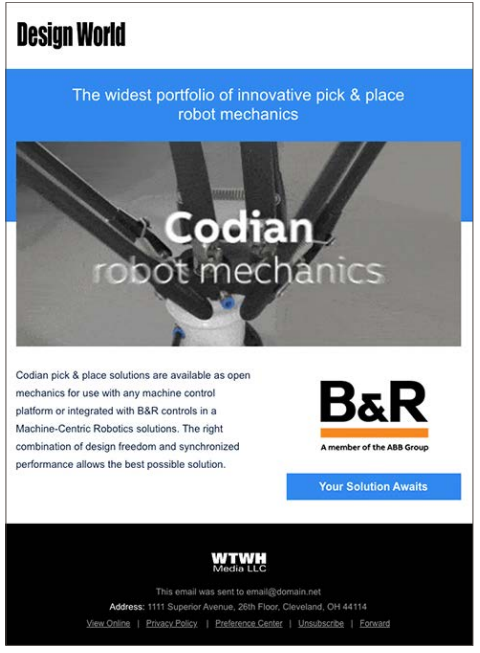
CoBranded e-newsletters
Design World uses standard e-newsletter template and includes client provided content. Sponsorship includes all ad placements + logo recognition
SPECIFICATIONS:
- Preferred subject line (recommend 70-80 characters including
spaces) - Client logo + URL
- 728×90 + URL (Optional – This is displayed at the top of the newsletter)
- 300×250 ad + URL (optional)
- Up to 6 text ads which would include:
- 450×255 static image
- Headline (5-10 words)
- Copy (30-35 words)
- CTA text (3-5 Words)
- URL
- 1 featured Video (optional) which includes:
- 450×255 static image
- Headline (5-10 words)
- Copy (30-35 words)
- CTA text (3-5 Words)
- URL
Online Display
Run of site ads display across the entire network
DISPLAY AD CREATIVE SIZES
- ROS (Includes 728×90, 300×250, 300×600)
- 970×250 Billboard (ROS)
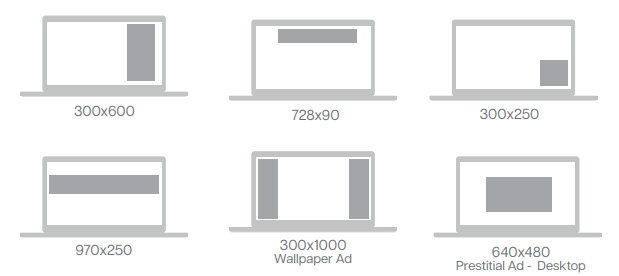
PRESTITIAL ADS
- 640×480 and 300×225
- Contact your representative for more details.
WALLPAPER ADS – RESPONSIVE DESIGN
- Simultaneously displays ad creative on the right and left hand sides of the site. Creative can be different for the left and right and can have specific urls for each side.
- Optional: In addition to the 300×1000, provide a 130×1000 for smaller desktop displays and a 320×50 image for mobile displays.
WALLPAPER SPECS:
- 300X1000, 130X1000 and 320×50
- File type: .gif, .jpg, .bmp, .png, videos (.mp4, VAST, YouTube), and HTML tags. File size: 4MB max for combined size of all assets.
- Contact your representative for more details.
DISPLAY AD & PRESTITIAL AD REQUIREMENTS
- File Type: jpg, gif or HTML5
- File size: max 1MB
- Animation: 3X Loop Limit
- Audio: Sound off by default
- Rich Media Accepted
TARGETING:
- Programs can be specifically targeted against relevant categories, geo, timing and exclusion across the Engineering.com Network.
High-Impact Display
High-Impact Display - Flex
The Allstream® Flex provides the ability to engage viewers with video and imagery in dynamically embedded experiences throughout page content with the ability to display edge-to-edge on the screen in the focal point of the viewer
ASSET SPECIFICATION
DESKTOP & MOBILE
- Asset Video: Video Dimension: 16:9 Aspect Ratio (ex: 1920 x 1080px) OR 4:1 Aspect Ratio (ex: 1920 x 480px)
- Asset Image (optional): Same Dimension as video provided (ex: 1920 x 1080px or 1920 x 480px)
FILE TYPES
- IMAGES
- Media Types: Image URL, GIF, JPG, BMP, PNG
- File Size: Allstream® hosted file size recommended under 100KB*
- VIDEOS
- Media Types
- Video URL, YouTube ID, VAST, MP4
- File Size
- Allstream® hosted file size recommended under 4MB*.
- Resolution
- 720p or 1080p
- Frame Rate
- 24-30 fps
- Bitrate
- Mobile Web: 800Kbps to 5000 Kbps
- Desktop: 800 Kbps to 10000 Kbps
- Media Types
*Combined size of all Allstream® hosted files (image + video) must be less than 4MB for Chrome Heavy Ad Intervention (HAI) compliance.
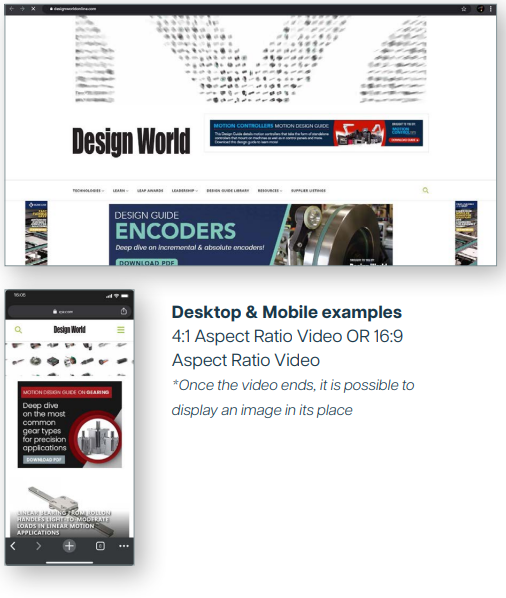
High-Impact Display - Prelude
The Allstream® Prelude dynamically displays adaptive imagery, video, or combination of multimedia at the top of the page for increased viewer engagement.
ASSET SPECIFICATION
DESKTOP & MOBILE (IMAGE ONLY)
Asset Image: Image Dimension: 4:1 Aspect Ratio; 1920x480px (Recommended Size)
FILE TYPES
- IMAGES
- Media Types: Image URL, GIF, JPG, BMP, PNG
- File Size: Allstream® hosted file size recommended under 100KB*
- VIDEOS
- Media Types
- Video URL, YouTube ID, VAST, MP4
- File Size
- Allstream® hosted file size recommended under 4MB*.
- Resolution
- 720p or 1080p
- Frame Rate
- 24-30 fps
- Bitrate
- Mobile Web: 800Kbps to 5000 Kbps
- Desktop: 800 Kbps to 10000 Kbps
- Media Types
*Combined size of all Allstream® hosted files (image + video) must be less than 4MB for Chrome Heavy Ad Intervention (HAI) compliance.
First-Party Audience Targeting
Content Affinity Targeting
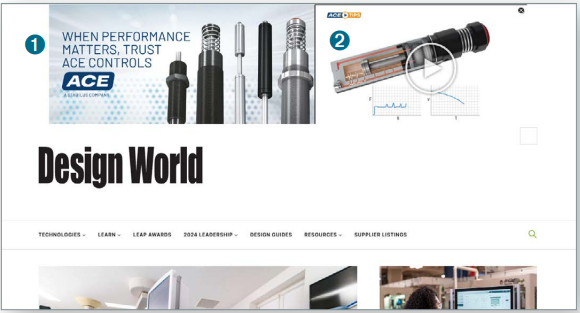
We use our first-party data platform to identify and engage targeted audiences with relevant ad experiences based on our site users content consumption habits.
CONTENT AFFINITY TARGETING
- Target by content affinities across the Engineering.com network
- Your message serves to site users based on their content affinity
Contact your sales representative for more information and package pricing.
Online Ad Specifications:
- Headline (no more than 8 words)
- One sentence description (no more than 25 words)
- 386×225 image
- Click-through URL
Audience Extension
Intent-Based Marketing | Account-Based Marketing
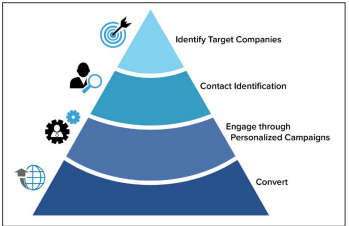
Our AI data management tool analyzes content consumption of users at hundreds of thousands of B2B companies and identifies when users in those organizations are indicating active demand for products or services you offer. Leveraging your target account list, our data management platform identifies anonymous users available for targeting at those companies you are trying to reach. Ads are displayed across the internet on brand safe sites.
INTENT-BASED MARKETING
- Target users outside our network across the internet by intent topic via display ads.
- Narrow down reach by industry, title, geography or company size.
ACCOUNT-BASED MARKETING
- We target your prospects based on your target account list.
- Target ABM users outside of our network across the internet with display ads.
Specifications:
- 728×90, 300×250, 300×600,160×600, 320×50, 300×50 & 970×250 (jpg, gif, standard HTML5)
- Max Initial File Load Image: 40KB / Max Initial File Load HTML5: 200KB
- Max Animation: 30 seconds or less (loops included); 15 seconds recommended; max 3 loops
- Clicktags Accepted
- Click-through URL
Remarketing / Retargeting Campaigns
Reinforce Branding | Increase Engagement | Improve Conversions
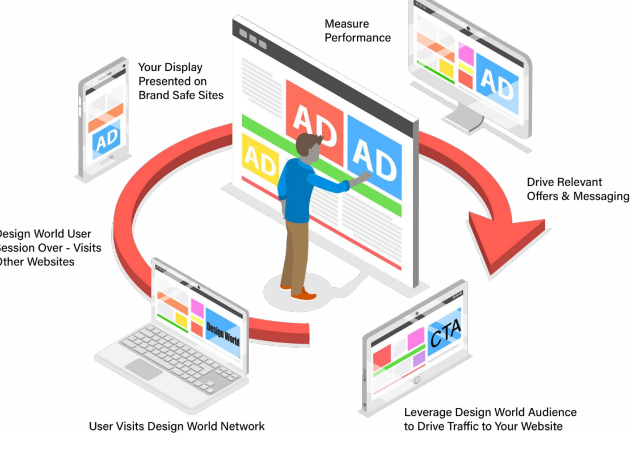
- Retargeting (also known as behavioral remarketing) is a form of digital marketing that focuses on targeting users who have previously visited our website with banner ads on display networks across the web.
- Increase the reach of your display campaigns by leveraging the Engineering.com Network to retarget key segment audiences.
- Engineering.com offers the ability to manage retargeting campaigns for our customers across a variety of platforms including any Engineering.com Network website.
Pricing based on CPM volume and custom ROI programs
RETARGETING REQUIREMENTS:
- File size: less than 150KB
- Animation: less than 30 seconds
- File Type: JPG, PNG and GIF (up to 30 seconds, 15-20 fps, no looping)
- CPM Pricing varies by program
CREATIVE SIZES:
- 300×600, 728×90, 300×250, 970×250, 320×50, 160×600
Webinars
Engage a captive audience and generate leads. Engineering.com webinar series offers companies the opportunity to work with editors on preparing and delivering both editorial and custom content in a live, interactive format or on-demand.
EDITORIAL WEBINARS
Engineering.com has developed a webinar schedule and invites engineers to share their experiences and expertise to help design engineers better understand technology or product related issues and challenges. Engineering.com editors will select a limited number of engineers to participate in each webinar.
- January: Roundtable: Design and manufacturing trends for 2026
- February: Digital transformation: Managing AI risks
- March: Careers: Skills-based education and hiring
- April: Design & simulation: The democratization of simulation explained
- June: 3D printing: Additive manufacturing standards for aerospace
- August: Roundtable: Advancements in automotive testing
- October: Careers: Return to work programs
- December: Roundtable: What it means to be an engineer in 2026
CUSTOM WEBINARS
Sponsor chooses their own topic and presents educational material related to that
topic. Engineering.com will assign an editor who will moderate the event and a technical coordinator who will coordinate promotions and produce the live event.
Recommendations:
- Position yourself as a thought leader by presenting on educational topics in your industry
- Attract great leads by describing what your attendees will gain from participating
- Includes graphics, images and downloadable assets
- Use poll and survey questions to increase engagement and take the pulse of your audience
- Present using webcam to create a captivating presentation
- Utilize HTML5 technology to ensure your attendees will have the best viewing experience
All webinars are recorded and emailed to all registrants, then placed online behind registration for on-demand viewing. Sponsors receive reporting URL for full attendee contact information, live and on demand metrics and survey results, if applicable.
Contact your sales representative for more information and package pricing.
Design Guides & Engineer's Toolboxes
Design Guides
Content focused on key technologies available as a downloadable PDF per category.
Sponsor a design guide and hard leads will be delivered to you based on the amount of leads you designate. Our design guides include key technology content produced by the Editors of Engineering.com.
Contact your sales representative for details
DESIGN GUIDES REQUIREMENTS FOR SPONSORED PDF:
- Hi Res Logo (min 200 pixels or higher or eps/ai version) + URL Link
- Hi Res product photo to use for Front Cover of Design Guide (optional)
- Full Page PDF ad to be in inserted as the last page/back cover of the Design Guide PDF
Engineer's Toolbox
Vendor neutral content broken out by key technologies, produced as a gated downloadable PDF with multiple sponsors per category
TECH TOOLBOX SPECS OVERVIEW:
- Vendor neutral content and images (images will not be sponsor/supplier
product images with the exception of sponsored content page). Logo
placement on front cover — vector (preferred). - Sponsor can include an advertisement (hi-res pdf or jpg and will be placed
and sized accordingly), full page of supplied content (limited to full page with
or without image), and video.
2026 ENGINEER’S TOOLBOX SCHEDULE:
- February: Additive material matters: Metals
- March: Automotive: Software-defined vehicles (SDVs)
- April: Design: The engineer’s guide to product visualization
- May: Digital transformation: How to leverage data in manufacturing
- June: BIM: Digital tools for sustainable design and construction
- July: 3D printing: Additive manufacturing failure analysis
- August: Aerospace: Advanced materials guide
- September: Digital transformation: Managing the transition from legacy to modernity
- October: 3D printing: Guide to post processing
- November: Simulation: How AI is rewriting the simulation playbook
Content Syndication
Audience Marketing | Lead Generation
AUDIENCE MARKETING
Fully Managed Content Syndication
- Promote content to specific targets
- Global contact record database available for selection
- Assistance in designing campaigns
- Leads delivered in time frame needed
Lead Generation Campaigns
- All lead types are qualified but some types are highly qualified based on level of engagement by the prospects.
Content Assets
- Choose the type of content you would like to promote
- Leverage assets that are relevant to the audience and educational
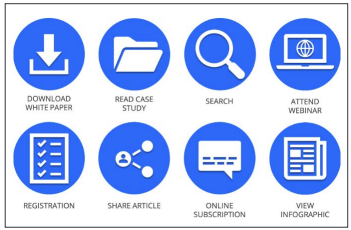
- White Paper | Case Study | Infographic | On-Demand Video
- MQL Gated
- Marketing qualified lead
- BANT Performance
- A lead that has consumed 1 piece of content and answered additional qualifying questions related to budget, authority, need and timeline identifying the lead as a higher value prospect
- 2-Touch Performance MQL
- A lead has consumed two pieces of content
Supplied Content
Your supplied content within the confines of our editorial websites
CUSTOM NATIVE CONTENT PROGRAM
- Dedicated content page featuring all articles
- All content is provided by advertiser (articles, images and links)
- Content appears on the brand website home page
- Featured in brand e-newsletter
- Brand social media promotion
- Content is archived
Cost: Contact your sales representative for details
SPONSORED CONTENT
- One content article provided by sponsor (900 words or less, title, image and URL)
- Content appears on the brand website home page and is labeled as “Sponsored Content”
- Featured 2x in brand e-newsletter
- 2 posts on brand LinkedIn page for the month
- Content is archived after one month
SPECIFICATIONS:
- Featured article image for slider and thumbnail at 770×500
- Hero Image for the top of the article – up to 740px across; can be the same as the Featured image
- For the Content:
- Headline
- Sub-headline (Optional)
- Body Copy – 900 words or less; include URLs
- Supporting images (Optional)
- Up to 500px wide
- Author information – Name & Title
- For the Content:
We will use the above to build out the landing page for your review.
Once that is approved, we then promote that page via our newsletters and social media.
Roundtable Videos
This exciting new program delivers high-value information in a theme-focused roundtable discussion with industry thought-leaders. Hosted by our professional moderators, 3 to 4 panelists engage in a live-to-tape video session that runs 40-60 minutes. The guests for the events can be sourced from the sponsor, external resources, or engineering.com internal specialists. Roundtable videos are produced in our dedicated studio with commercial-grade remote video links to the panelists. A host-guided question format is used to focus on a central theme, and the panelists interact with each other the same as they would during a live roundtable. Lead data is collected and a full report is provided. Each roundtable is available on demand at engineering.com and the reproduction can be used in your future marketing.
WHAT’S INCLUDED?
- Research and content development
- Roundtable moderation
- Professional video in a studio environment
- Video post-production and editing
- Video featured in a story on engineering.com
- Transcription and post-event report
- Perpetual license of the video content
- Promotion and reporting
PROGRAM REQUIREMENTS
- 3-4 subject matter experts (internal, partners, or our resources)
- Bios and headshots of panelists
- Microsoft Teams, webcam/laptop, office or home office setting
PRODUCTION TIMELINES:
- 30-minute kick-off meeting to discuss timelines, requirements, and marketing
- Content alignment through e-mail or meeting
- 2 hours slotted for recording (often less time needed)
- Video review, editing, approvals, and final cut
- Video published on engineering.com
- 3-month promotion plan
Webshows
Designing the Future • Manufacturing the Future
Our “Future Series” of webshows consists of two independent streams on our engineering.com/tv platform, professionally moderated in30-minute sessions.
We showcase senior business and technical leaders who share their vision and insight about design and manufacturing innovation, emerging trends, and how forces like the pandemic will impact these fields moving forward.
These programs will offer your leaders and company great exposure, with links back to your website for our audience to continue topic discovery, ideally pointing to thought leadership blogs, videos, or podcasts. The session recording will be provided to you as a deliverable to leverage in your marketing mix.
DESIGNING THE FUTURE
Designing the Future is hosted by Michael Alba. Michael is the Senior Editor of engineering.com. He writes about design software, computer hardware, and other engineering topics. Michael holds a degree in Engineering Physics from the University of Alberta.
MANUFACTURING THE FUTURE
Manufacturing the Future is hosted by well-known manufacturing expert Jim Anderton. Jim has contributed to various leading industry publications as our Director of Content and former Editor of Canadian Metalworking Magazine. In addition, he has experience in quality and part design with a of Tier 1 automative supplier.